 ReagentFlow
On-hand
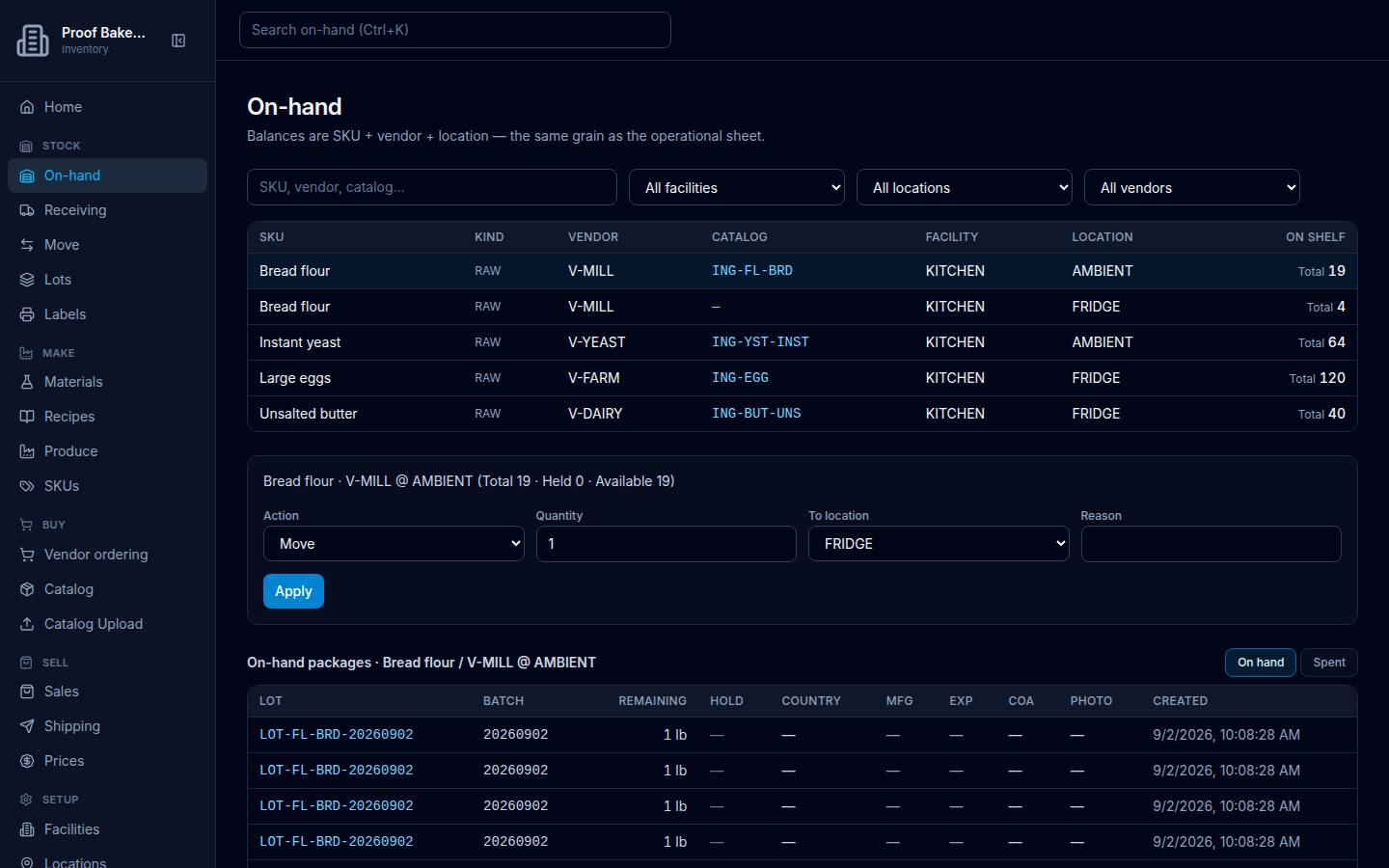
Page title On-hand. Description on screen: Balances are SKU + vendor + location — the same grain as the operational sheet. Scan or deep-link a package to see its produce genealogy.
Find a balance
- Open On-hand in the sidebar (or use the header search Search on-hand (Ctrl+K), which goes to this page).
- Type in the field with placeholder SKU, vendor, catalog….
- Optionally set All facilities, All locations, and All vendors to a specific code.
The table columns are SKU, Kind, Vendor, Catalog, Facility, Location, and On shelf. A SKU with a catalog photo shows a small thumbnail in the SKU column (see Catalog photo). On-shelf cells show a Total quantity.
If the list is empty: Nothing on hand / Receive stock to put items on the shelf. Roles that can receive get Receive stock. See empty On-hand.
On shelf, held, and available
On shelf / Total is the full quantity still in the bin, including units that are on hold. When you select a row, the summary reads like Total · Held · Available.
Available is what you can sell: on-hand minus held, minus quantity already reserved on an open sale (backend reserve). That reserved amount is already reflected in Available — the Sales list in this capture does not show a separate Reserve label, Reserved badge, or Reserve button.
Held rows stay on this page. They are not hidden. A sale can use only available quantity — the quantity field’s maximum is that available amount, and trying to sell more is rejected with Only [count] available (unheld) to sell.
Act on a selected balance
Select a row. A form appears with the SKU, vendor, location, and a summary like Total [n] · Held [n] · Available [n], plus:
- Action — Move, Adjust, Sale, and/or Shrink (only the actions your role allows).
- Quantity, or Delta (+/−) when the action is Adjust.
- To location when moving (empty option: No other bins here).
- Reason for Move, Adjust, and Shrink (required for Adjust and Shrink).
- Reference for Sale.
Choose Apply (or Working…). Success copy is Updated.
| Action | Roles that get it |
|---|---|
| Move | ADMIN, INVENTORY_CLERK, RECEIVING |
| Adjust | ADMIN, INVENTORY_CLERK |
| Sale | ADMIN, SALES, INVENTORY_CLERK |
| Shrink | ADMIN, INVENTORY_CLERK |
Units and movements
After you select a balance, the page can list On-hand packages / ON_HAND units (columns include LOT, BATCH, REMAINING, HOLD, COUNTRY, MFG, EXP, COA, PHOTO, CREATED) and Movements for that SKU/vendor. If there are no units: No ON_HAND units for this balance.
Hold badges on a unit: Held (lot), Held (unit), Held (unit+lot), or Held, optionally with a reason. Unheld units show an em dash in that column.