 ReagentFlow
Prices
Page title Prices. Description on screen: Master list is SKU + size. Suggested is cost-plus preview from recipe remaining landed cost. Stored is the live shop price. Use suggestion writes the suggested list as stored — a recipe cost change never overwrites the shop. Timed percent-off promotions still change the effective price.
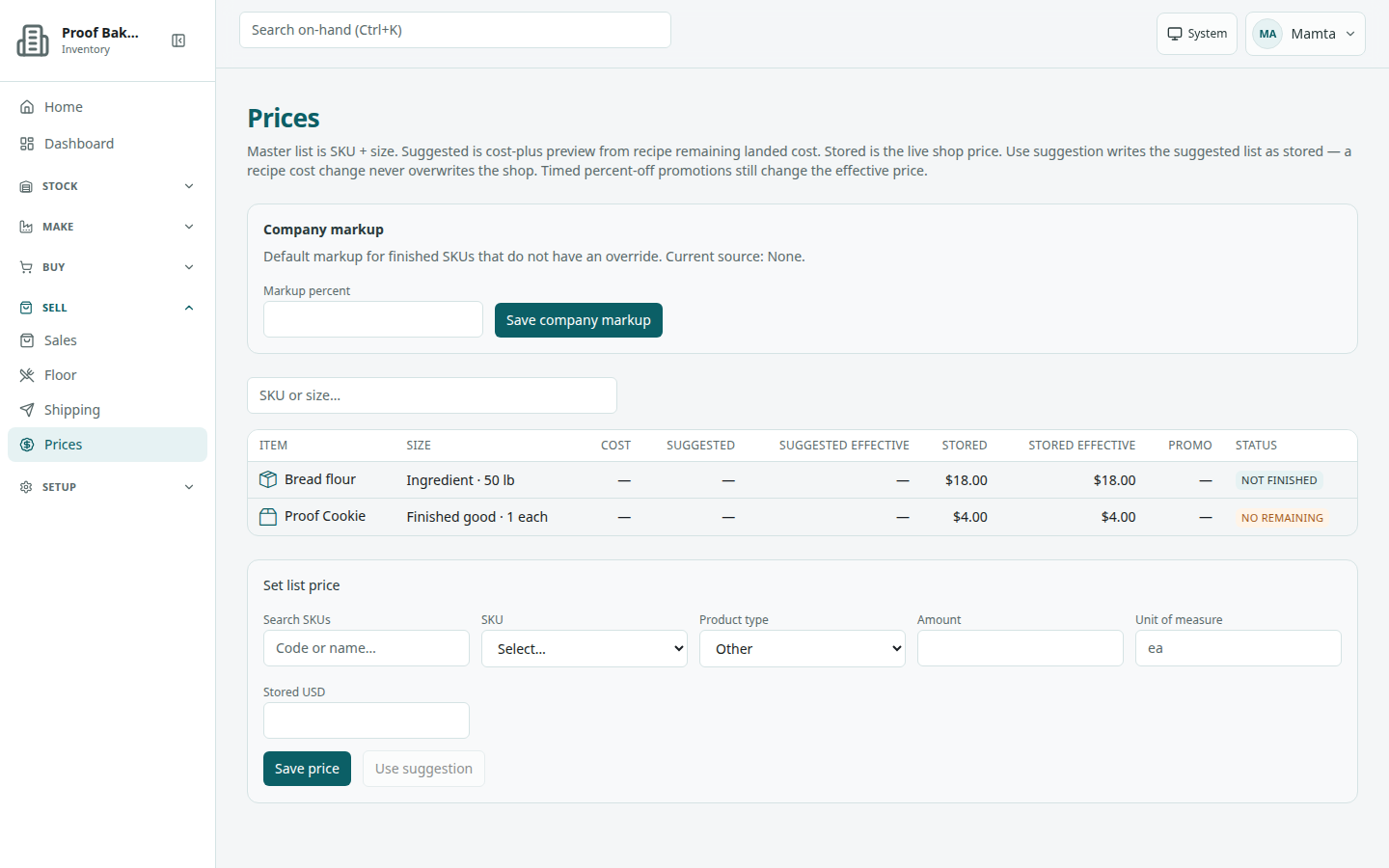
/prices).Company markup
Heading Company markup: Default markup for finished SKUs that do not have an override.
- Enter Markup percent (0–1000).
- Choose Save company markup.
Success: Company markup saved. If none is stored: No company markup is set. Clerks who cannot write see the resolved percent as text instead of the form.
Read the list
Search placeholder SKU or size… (label Search prices). Loading: Loading prices… Empty: No sale prices yet — writers see Set a company markup and a list price for a finished SKU size to start.; others see Nothing on the master price list.
Columns: Item, Size, Cost, Suggested, Suggested effective, Stored, Stored effective, Promo, Status.
Status badges when a suggestion cannot be computed: Not finished, No recipe, No remaining, No landed cost, or No markup. Hover a badge for the reason. Those match: cost-plus applies to finished SKUs only; the finished SKU has no recipe lines; a recipe raw SKU has no remaining on-hand; remaining stock has no landed cost (opening or receive without a PO); or no company/SKU markup is set.
Stored is the live shop price that sales use. Suggested is only a preview; it never changes the stored price on its own, even when recipe costs change.
Set a stored price
Select a row, or pick a SKU in the form. The Set list price form has Search SKUs (placeholder Code or name…), SKU (Select…), Product type, Amount, Unit of measure (placeholder ea; starts empty, so type the unit), and Stored USD.
- Fill every field. Stored USD must be at least 0.01.
- Choose Save price (it reads Saving…). Success: Price saved.
Use suggestion
Use suggestion writes the suggested list straight into the stored shop price. Nothing changes until you click it. The panel under the form says: Cost [cost] · markup [percent] ([source]) · suggested [price]. Suggested is a preview. Use suggestion writes it as the stored shop price; it does not run until you click it.
- Select the row.
- Choose Use suggestion (it reads Using suggestion…).
- Success: Stored price updated from suggestion.
The button is disabled when there is no suggestion; the panel then shows the reason in amber instead. The panel heading is History · [item] when a stored price exists, or Cost-plus · [item] when it does not. History empty: No history yet.
SKU markup override
On a finished SKU, SKU markup override has Override percent, Save SKU markup, and Clear SKU markup. Empty: No SKU override. Company default applies when set. Success: SKU markup saved. / SKU markup cleared. Source labels: SKU override, Company default, or None.
Promotions
Heading Promotions: Promotions hang off a stored list price. Empty: No promotions on this size. Add with Percent off, Starts, Ends, and Add promotion. Success: Promotion added.